
HVAC websites & ongoing care

HVAC Website Design

Three kinds of customer. A clear next step for each.

Someone needs a repair. Another customer is planning a replacement. A property manager wants ongoing care. Your website should help each find the relevant service and reach the right team. Ekyon can design that journey, connect it to an agreed contact or scheduling route, and handle continuing website work. Start with your existing tools and the requests your office needs.

Discuss your websiteSee the customer journey
Original concept illustration of a comfortable room, a blank thermostat and warm and cool airflow ribbons
Original concept illustration. Actual Ekyon website work is shown below.

A useful path through the site

Start with what your customer came to do.

01

Choose repair, replacement or care

02

Check the service area

03

Use the right contact route

Illustrative page journey. Content, availability and operational details come from your business.

A repair request needs a clear contact route

Make services, coverage and current contact hours easy to find on a phone. Give the customer a clear way to call or request a response. Your team confirms urgent-service wording and what happens after a request arrives. Distinguish a submitted request from a booked technician.
A replacement enquiry needs useful context

Explain the installation or replacement work you take on and how an estimate begins. Approved projects, business credentials and the process help someone decide whether to contact you. Collect useful initial context, while equipment assessment and pricing remain with your team.

Care and commercial work need their own explanation

A maintenance plan or commercial contract needs its own explanation: approved scope, who it fits and the next step. Keep details current and name the receiving person, especially when different staff handle residential and commercial work. Visitors should understand which conversation they are starting.

Plan the customer route

Build around the work your office wants to receive.

Before choosing a new layout, review how customers currently find a service, contact you and get a response. We agree the important pages and handoffs, then design the website around those decisions.

01

Service pages grounded in your business

Organise repair, installation, maintenance and commercial information where relevant. Your team approves service facts, coverage, credentials and offers. We turn them into clear pages with relevant next steps. The scope names the pages and copywriting or editing, settling content responsibility before launch.

02

Coverage that customers can understand

Show the areas and locations you serve, with appropriate contact details. Agree how customers outside the area are handled. Give coverage and office updates a named owner. Each location page should contain useful local business information that your team can confirm.

03

Requests tested through the receiving step

Choose the information your office needs for an initial request. Test the mobile form, confirmation and receiving route with your team. Keep an appropriate alternative contact available. Check that the office received the request as well as what the customer saw after submitting.

Work with your existing setup

Make the scheduling handoff understandable.

You may already have a tool that handles appointments or field work. We review the website's role in that setup before suggesting a replacement. The proposal identifies the supported connection and its limits.

01

Keep a suitable scheduling tool

A link or supported embed may be enough to enter your existing booking process. We check access, mobile behaviour and configuration before agreeing the connection. Deeper integrations require their own assessment. Name the software you use so we can discuss the actual handoff.

02

Distinguish requests from confirmed appointments

If a customer selects a preferred time, explain whether it is a request or an available appointment. Agree who confirms it and the customer message. Your office owns the service schedule and response; Ekyon's website support coverage is separately defined.

03

Review the current site before moving it

Identify useful service pages, links and forms before redesigning. If addresses or platforms change, agree the content transfer, relevant redirects and launch checks. A site worth keeping may need focused improvements. Establish starting repairs and platform support before ongoing care begins.

After launch

Keep the website ready for the next busy season.

Seasonal information should have an update process before it goes out of date. We can combine website care, agreed changes and search work in one plan, with clear capacity and approval contacts.

01

An ordinary month's changes

Describe the updates you postpone: an approved offer, hours, a service or a project. Agree an allowance and visible request list. Your team approves facts and significant changes. New functionality and work beyond that capacity receive a separate scope.

02

Technical care with clear responsibility

Define supported updates, backup and recovery arrangements, and important customer-action checks. Identify systems that remain with another supplier. Name support coverage, escalation and larger repair boundaries, so you know who investigates a website issue and what responsibility the plan includes.

03

Search work with its own priorities

When included, research relevant searches and improve pages, titles, links and technical access. Keep information readable and structured data consistent with visible content for conventional and AI search. Review impressions, useful visits and enquiries separately. Give this work its own capacity.

Website work you can inspect

A real build, with its scope visible.

Inspect Ekyon's actual website work and its stated delivery scope. These establish general website design and development, without measured HVAC results. The journeys on this page are proposed planning examples.

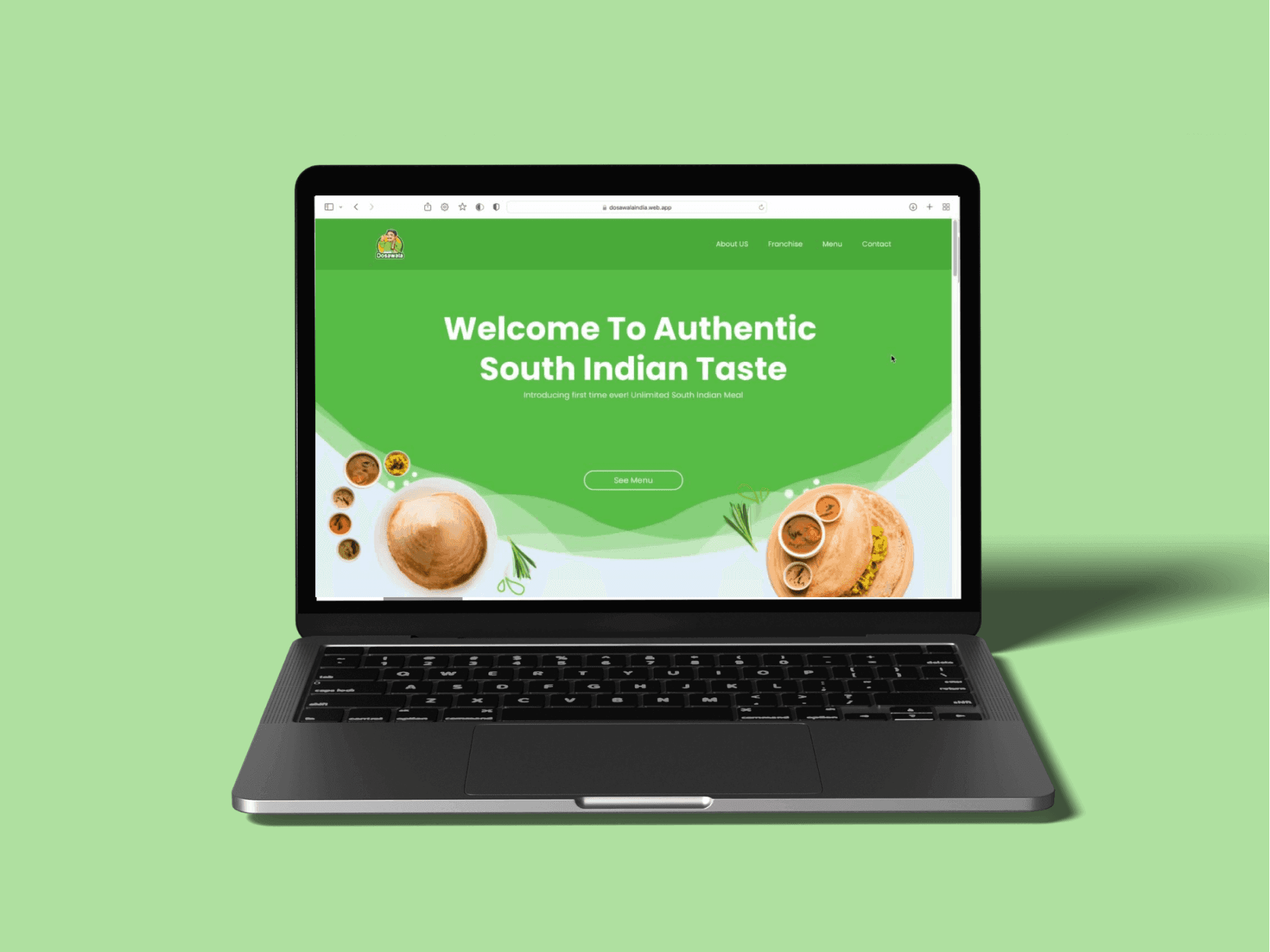
Explore the Dosawala restaurant website

Dosawala is a restaurant brand website. See its delivered scope in the case study.

Actual Dosawala restaurant brand website designed and built by Ekyon

A scope you can review

Plan the build and the work after launch.

Our fit guideline is a first-year service engagement of US$5,000 or more, combining starting work and agreed care. This is a qualification, not a fixed package. We review scope before quoting. Hosting, domains, licences and paid tools are identified separately.

Try the website budget plannerRead the redesign cost guideExplore ongoing website care

Before you decide

Questions about hvac website design.

Can you work with our existing HVAC booking software?

We review access, provider capabilities and mobile behaviour before agreeing a link, embed or supported integration. Custom integration and field-service system changes are separately scoped. A booking button must lead to an understood process.

Can you improve the current site without rebuilding it?

Yes, when the platform and implementation are suitable. We review pages, contact routes and issues, then agree focused changes or takeover. Starting repairs are separate from care. Rebuilding is considered against the actual need.

Who keeps seasonal offers and service details current?

Your team approves facts, dates and terms. Ekyon can publish agreed updates within the plan's capacity. We name an approval contact and request process. Advertising and additional work require their own agreement.

Does the service include SEO and AI search readiness?

These can be included as defined research, content and technical work. We keep business information clear, review search access and align structured data with the page. They are separate responsibilities from routine maintenance. Rankings, AI recommendations and a particular number of leads cannot be guaranteed.

What do you need for a first conversation?

Share your site, services, coverage, important customer actions, scheduling tools and a typical month's updates. Describe requests that reach the wrong team. Account access is arranged after scope through an agreed process; a technical specification is unnecessary.

Bring your current website or your plans

Start with the requests your office needs.

Show us your website and how repair, replacement and care enquiries should reach your team. We will discuss a useful starting scope, the existing tools and who handles the continuing work.

Discuss your websiteSend a project enquiryhello@ekyon.io

More about working with Ekyon.

Website redesign, maintenance and SEORedesign and launch checklistExplore the other website journeys